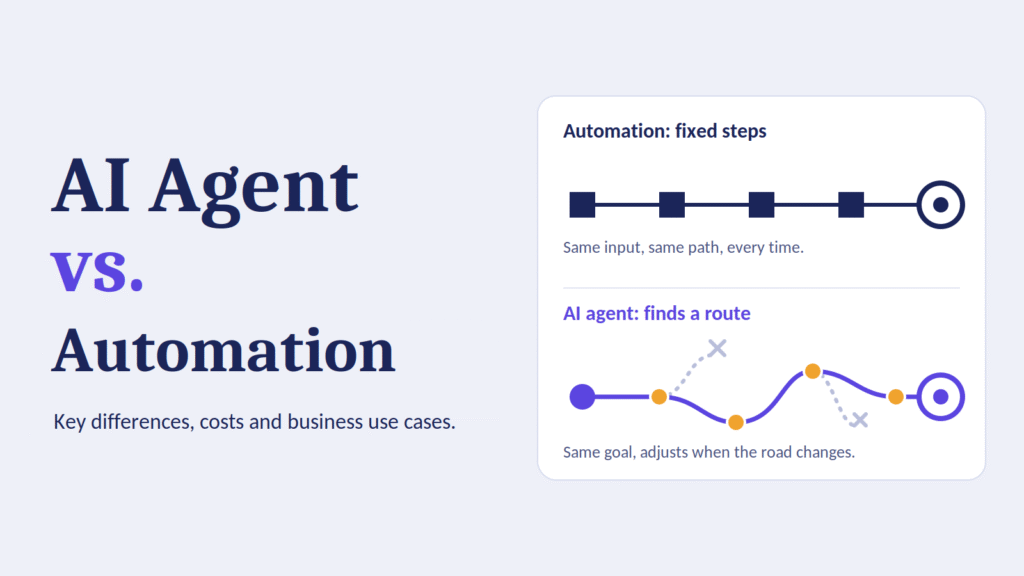
A finance team automates invoice processing. A rule says: if the invoice matches the purchase order, approve it. It works beautifully until a supplier sends an invoice in a new format, with a missing PO number and a note that says “as discussed with Priya.” The automation fails, the invoice lands in a queue, and a person spends twenty minutes sorting it out.
Now imagine a system that reads the invoice, notices the PO number is missing, searches the email thread for “Priya,” finds the likely match, asks Priya to confirm in one line, and routes the approved invoice for payment. Nobody wrote a rule for that exact situation. The system worked out what to do.
That difference is at the heart of the AI agent vs automation debate. Both save time. Both reduce manual work. But they are built on different ideas, they fail in different ways, and they cost different amounts to build and run.
This guide explains the key differences in plain language, compares costs honestly, shows where each approach wins, and gives you a framework for deciding which one fits your business. If you are evaluating intelligent automation options, or trying to understand where enterprise AI agents actually belong, this is the comparison to start with.
What Is Traditional Automation?
Traditional automation uses predefined rules and fixed steps to complete repetitive tasks. A human designs the workflow in advance, defines every condition, and the software follows that script exactly.
It comes in a few common forms:
- Workflow automation: tools that connect apps and trigger actions, such as “when a form is submitted, create a CRM record and send a Slack message.”
- Robotic process automation (RPA): software bots that mimic human clicks and keystrokes in a user interface, often used where there is no API.
- Scripts and scheduled jobs: code that runs on a timer or event, such as nightly data syncs.
- Business process management (BPM) engines: systems that orchestrate multi-step approvals and handoffs with defined paths.
- Integration platforms: middleware that moves data between systems according to mapping rules.
How traditional automation works
The logic is deterministic. Given the same input, it produces the same output every time. A typical flow looks like this:
- A trigger fires (a new email, a file upload, a scheduled time).
- The system checks conditions (if amount is greater than 5,000, route to a manager).
- It performs a fixed action (create a record, send a message, update a field).
- It ends, or hands off to the next fixed step.
Strengths of traditional automation
Predictability. You always know what it will do. That makes testing, auditing, and compliance straightforward.
Speed and low cost per run. Rule-based steps are fast and cheap to execute, often costing fractions of a cent per transaction.
Maturity. The tools are well understood, the talent pool is large, and best practices are established.
Easy to explain. When something goes wrong, you can trace the exact rule that fired.
Limits of traditional automation
Brittleness. Change a field name, redesign a screen, or receive data in an unexpected format, and the automation breaks.
Poor with unstructured data. Emails, PDFs, chat messages, and voice notes do not fit neatly into rules.
Heavy maintenance. Every exception becomes a new rule. Over time, workflows grow into tangled branches that few people fully understand.
No judgment. It cannot weigh trade-offs, interpret intent, or handle situations it was not explicitly told about.
Traditional automation is excellent at doing the same thing the same way, at scale. It struggles the moment reality gets messy.
What Is an AI Agent?
An AI agent is software that uses an AI model, usually a large language model, to pursue a goal. Instead of following a fixed script, it decides what steps to take, uses tools to take them, observes the results, and adjusts.
Three capabilities define an agent:
- Reasoning: it interprets a goal, breaks it into steps, and decides what to do next.
- Tool use: it can call APIs, query databases, search documents, send messages, run code, or operate software.
- Looping with feedback: it checks the result of each action and changes course if something did not work.
How an AI agent works
Instead of a fixed flowchart, an agent runs a loop:
- Understand the goal. “Resolve this customer’s refund request.”
- Plan. Decide what information is needed.
- Act. Look up the order, check the refund policy, review the customer’s history.
- Observe. Read what came back.
- Adapt. If the order is outside the return window, check whether an exception applies.
- Finish or escalate. Complete the task, or hand it to a human with a clear summary.
Types of AI agents in business
- Single-task agents: focused on one job, such as summarizing support tickets or drafting sales follow-ups.
- Copilots: assist a human who stays in control, suggesting actions and drafting content.
- Autonomous or semi-autonomous agents: complete multi-step work with limited supervision, often with approval gates for sensitive actions.
- Multi-agent systems: several specialized agents collaborate, for example one researches, one drafts, and one reviews.
Strengths of AI agents
Handles ambiguity. Agents can interpret messy language, incomplete data, and unusual requests.
Works with unstructured data. Emails, contracts, call transcripts, and documents are native territory.
Adapts without rewriting rules. When the situation changes, the agent can often adjust without a developer rebuilding the workflow.
Covers long-tail work. The rare, strange cases that never justified building an automation can finally be handled.
Natural interface. People can instruct agents in plain language.
Limits of AI agents
Non-determinism. The same input may not always produce the same output. That complicates testing and compliance.
Errors that sound confident. Models can make mistakes or invent details while sounding certain.
Higher and more variable cost per task. Each run consumes model usage, and complex tasks can involve many steps.
Slower. Reasoning loops take seconds or minutes, not milliseconds.
Harder to audit. Explaining exactly why an agent made a choice is more difficult than pointing to a rule.
Security exposure. An agent with broad tool access can cause harm if it is manipulated or misconfigured.
Agents are powerful where judgment and flexibility matter. They are risky where precision and predictability matter more.
AI Agent vs Automation: Key Differences
Here is a side-by-side comparison of the two approaches.
| Dimension | Traditional automation | AI agent |
|---|---|---|
| Core logic | Predefined rules and fixed steps | Goal-driven reasoning and dynamic steps |
| Behavior | Deterministic: same input, same output | Probabilistic: outputs can vary |
| Input types | Structured data, predictable formats | Structured and unstructured data |
| Handling exceptions | Fails or escalates unless a rule exists | Attempts to reason through, escalates when unsure |
| Setup effort | Design every step and condition upfront | Define goal, tools, guardrails, and evaluation |
| Maintenance | Update rules as processes change | Tune prompts, tools, and evaluations; monitor behavior |
| Cost per run | Very low and predictable | Higher and variable |
| Speed | Milliseconds to seconds | Seconds to minutes |
| Auditability | Simple, rule-by-rule trace | Requires logging and reasoning traces |
| Best for | High-volume, stable, rule-driven tasks | Variable, judgment-heavy, language-rich tasks |
| Main risk | Breaks when things change | Wrong or unpredictable actions |
The single most useful distinction
Automation executes a process. An agent pursues an outcome.
With automation, a person decides how the work gets done, and the software repeats it. With an agent, a person decides what result is wanted, and the software figures out how to get there, within limits.
That one shift explains almost every other difference in the table.
A simple analogy
Traditional automation is a train on tracks. It is fast, efficient, and reliable on its route, but it cannot go anywhere the tracks do not reach.
An AI agent is a driver with a map. It can handle detours and unexpected roads, but it takes more skill to supervise, it can take a wrong turn, and each trip costs more fuel.
Most businesses need both.
Where Intelligent Automation Fits
You will often see the term intelligent automation used in this conversation. It usually means combining traditional automation with AI capabilities such as machine learning, natural language processing, and document understanding.
It sits in the middle of the spectrum:
- Rule-based automation: fixed logic, no AI.
- Intelligent automation: fixed process structure, with AI handling specific steps, such as classifying a document, extracting data from an invoice, or detecting sentiment.
- Agentic automation: AI decides the steps, uses tools, and adapts.
Think of it as a dial, not a switch. A workflow might use rules for the predictable backbone and an AI step for the messy part. For example:
- A rule triggers when an email arrives in the claims inbox.
- An AI model classifies the claim type and extracts key fields.
- A rule routes it based on claim type and amount.
- An agent investigates unusual claims by reviewing documents and past cases.
- A rule posts the approved payment.
This hybrid pattern, often called AI workflow automation, is where many of the best results come from. You keep the reliability of rules where reliability matters, and apply AI where flexibility matters.
Cost Comparison: What You Will Actually Pay
Cost is where many AI agent vs automation comparisons get vague. Let us break it down honestly. Exact prices vary widely by vendor, scale, and region, so treat the figures here as a framework for estimating, not as quotes.
Cost components of traditional automation
Platform and licensing. Subscription fees for workflow tools, RPA licenses, or integration platforms. Pricing is commonly based on users, bots, tasks, or connectors.
Build cost. Analyst and developer time to map the process, build workflows, and test them. Simple automations can take hours. Complex, multi-system workflows can take weeks.
Maintenance. Ongoing updates when systems change. For UI-based RPA especially, maintenance can become a large share of total cost over time.
Infrastructure. Servers, bot runners, or cloud usage.
Run cost. Typically small and predictable per transaction.
Cost components of AI agents
Model usage. Most agents pay per token or per request. A single task may involve many model calls for planning, tool use, and checking. Costs scale with task complexity and volume.
Build cost. Designing the agent’s goals, tools, prompts, and guardrails. Integrating with business systems. Building evaluation sets to test behavior. This often takes longer than expected because testing a non-deterministic system is harder.
Integration and data work. Agents need clean access to systems and knowledge. Preparing data, permissions, and retrieval systems is frequently the biggest hidden cost.
Evaluation and monitoring. Ongoing tracking of accuracy, failures, drift, and cost. You need logs and review processes.
Human oversight. Approval steps, exception review, and quality sampling.
Security and governance. Access controls, red-teaming, compliance review, and audit logging.
Run cost. Higher and more variable per task than rules-based automation.
An illustrative example
Suppose you process 20,000 support requests per month. The numbers below are hypothetical, chosen to show the shape of the trade-off, not to predict your real costs.
| Approach | Handles | Cost profile |
|---|---|---|
| Rule-based automation | Password resets, order status checks, simple routing (about 40% of volume) | Low per request, high upfront rule design, breaks on edge cases |
| AI agent | Refund exceptions, multi-step troubleshooting, complaints requiring judgment (about 30% of volume) | Higher per request, lower design effort for variety, needs oversight |
| Human team | Sensitive, high-value, or novel issues (about 30% of volume) | Highest per request, best judgment |
The best economics rarely come from using an agent for everything. They come from matching each type of work to the cheapest approach that meets the quality bar.
Key cost principles
Do not compare only run cost. An agent may cost more per task than a rule, but if it handles cases that previously needed an expensive human, the total cost can fall.
Do not ignore maintenance. A cheap automation that breaks monthly and needs a developer each time is not actually cheap.
Watch for runaway usage. Agents that loop, retry, or call tools excessively can drive up bills. Set budgets and step limits.
Use cheaper models for simpler steps. Many teams route easy tasks to smaller, cheaper models and reserve premium models for hard reasoning.
Measure cost per successful outcome. Cost per run is misleading. Cost per correctly resolved case is what matters.
Total cost of ownership over three years
When evaluating, project a three-year view:
- Year one: build, integration, and learning costs dominate.
- Year two: maintenance, monitoring, and expansion costs grow.
- Year three: efficiency gains compound if the system is well maintained, or erode if it is neglected.
For traditional automation, maintenance often creeps up as processes change. For agents, evaluation, monitoring, and model changes become the recurring work. Neither is “set and forget.”
When to Choose Traditional Automation
Traditional automation is usually the better choice when:
The process is stable and well defined. Payroll runs, report generation, data synchronization, and invoice posting follow the same steps every time.
Inputs are structured and predictable. Forms, database records, and API responses suit rules well.
You need exact, repeatable results. Financial calculations, regulatory filings, and anything where “mostly right” is unacceptable.
Volume is high and margins are thin. At millions of transactions, tiny per-run costs add up, and rules win on economics.
Audit and compliance demand a clear trail. A deterministic process is easier to certify.
Speed is critical. Real-time or near-real-time processing favors rules.
Examples
- Syncing customer records between CRM and billing.
- Generating and sending monthly statements.
- Routing tickets by category after a form is submitted.
- Applying standard approval thresholds.
- Moving files between systems on a schedule.
- Running nightly data pipelines and quality checks.
If a human could write the instructions on one page and never need to improvise, use automation.
When to Choose an AI Agent
An AI agent is usually the better choice when:
The work involves language and documents. Reading contracts, summarizing calls, drafting responses, and extracting meaning from messy text.
The path varies from case to case. Investigations, research, and support issues rarely follow one route.
Exceptions are the main cost. If your current automation handles 60% of cases and humans grind through the rest, an agent may handle many of those exceptions.
The task requires gathering information from several places. Pulling data from systems, documents, and the web, then synthesizing it.
Rules would be impossible to maintain. Some domains have too many variations for rule trees to stay manageable.
You want faster iteration. Changing an agent’s instructions can be quicker than redesigning a complex workflow.
Examples
- Triaging and resolving customer support issues that need several lookups.
- Preparing sales account briefs from CRM data, news, and call notes.
- Reviewing vendor contracts against internal policies and flagging risks.
- Investigating anomalies in financial transactions.
- Researching and drafting competitive analyses.
- Assisting IT service desks with troubleshooting across multiple systems.
- Screening and summarizing job applications according to defined criteria, with human review.
If a skilled person would need to think, search, and adapt to finish the task, consider an agent.
Business Use Cases by Function
Here is how the two approaches typically combine across departments. These examples show patterns that organizations commonly pursue. Results depend on data quality, process maturity, and governance.
Customer support
Automation: routes tickets, sends confirmation emails, resets passwords, updates order status, and enforces SLAs.
AI agent: reads the full ticket history, checks policy, drafts a tailored reply, handles refund exceptions within limits, and escalates complex cases with a summary.
Best combination: automation handles intake, routing, and standard requests. Agents resolve variable cases. Humans handle sensitive or high-value interactions.
Finance and accounting
Automation: posts approved invoices, reconciles standard transactions, generates recurring reports, and enforces approval thresholds.
AI agent: investigates mismatched invoices, reads supplier correspondence, flags unusual spending patterns, and prepares variance explanations for review.
Best combination: rules for the clean majority and agents for exception handling, with human approval on material decisions.
Sales and marketing
Automation: lead assignment, follow-up sequences, CRM field updates, and scheduling.
AI agent: researches prospects, summarizes account history, drafts personalized outreach, and prepares meeting briefs.
Best combination: automation keeps the pipeline clean and moving. Agents prepare the context salespeople need to have better conversations.
Human resources
Automation: onboarding checklists, payroll data flows, leave approvals, and compliance reminders.
AI agent: answers employee policy questions, summarizes candidate profiles, and helps draft job descriptions or internal communications.
Best combination: automation for transactional workflows. Agents for questions and content, with strict controls around sensitive personal data and fairness in hiring.
IT and operations
Automation: user provisioning, patching schedules, monitoring alerts, and backups.
AI agent: diagnoses incidents by reading logs and past tickets, suggests or applies fixes within approved boundaries, and writes post-incident summaries.
Best combination: automation for routine operations. Agents for investigation and triage, with limits on what they can change.
Legal and compliance
Automation: document routing, deadline tracking, and standard approval flows.
AI agent: reviews contracts against playbooks, summarizes regulatory changes, and flags clauses that deviate from policy.
Best combination: agents accelerate review, but qualified professionals make the final calls.
Supply chain and logistics
Automation: order processing, inventory updates, shipment notifications, and reorder triggers.
AI agent: investigates delays, reroutes shipments based on multiple constraints, and communicates with suppliers about exceptions.
Best combination: rules manage the predictable flow, and agents handle disruptions.
Enterprise AI Agents: What Changes at Scale
Running a prototype agent is easy. Running enterprise AI agents across a large organization introduces demands that small pilots never face.
Governance and accountability
Who owns each agent? Who approves what it can do? Who is accountable when it makes a mistake? Large organizations need clear ownership, documented purpose, and review processes before agents go live.
Access control and least privilege
An agent should only access the systems and data it needs, and only with the permissions required. Treat agents like employees with narrowly scoped roles, not administrators with open access.
Human-in-the-loop design
Decide where humans must approve actions. A common pattern is to let agents draft and recommend freely, but require approval for actions that spend money, change records, contact customers, or affect people’s livelihoods.
Evaluation and testing
Because agents are non-deterministic, you cannot test them once and trust them forever. Build evaluation sets of realistic scenarios, including difficult and adversarial ones. Re-run them whenever you change prompts, tools, or models.
Observability and logging
Log every step: the goal, the tools called, the data retrieved, and the final action. This supports debugging, audits, and continuous improvement.
Security risks
Agents introduce new risks, including prompt injection (malicious instructions hidden in emails or documents), data leakage, and over-permissioned tool access. Security teams should review agent designs just as they would review any system that can act on company data.
Compliance and data privacy
Understand where data flows, which models process it, and what regulations apply. Sensitive industries need particular care around retention, residency, and explainability.
Change management
People need to understand what agents do, trust them appropriately, and know how to escalate issues. Adoption fails when employees feel agents are imposed on them or when nobody knows who to call when something goes wrong.
A Decision Framework: How to Choose
Use these questions to decide between automation, an agent, or a hybrid.
Question 1: Can you write the steps down?
If you can document the process in a clear, finite set of rules, use traditional automation. If experts say “it depends” and rely on judgment, consider an agent.
Question 2: How structured is the input?
Structured data favors rules. Unstructured text, documents, and conversations favor AI.
Question 3: How costly is an error?
If an error is expensive, legally risky, or hard to reverse, favor deterministic rules or add strong human review. If errors are low-impact and easy to fix, agents are safer to try.
Question 4: How often do exceptions occur?
If exceptions are rare, handle them with humans. If exceptions are common and costly, an agent may pay off.
Question 5: What is the volume?
At very high volumes with simple tasks, rules win on cost. At moderate volumes with complex tasks, agents may be more economical than adding human headcount.
Question 6: How fast does the process change?
If policies, products, or formats change frequently, maintaining rules is expensive. Agents can adapt more easily, provided you keep their knowledge current.
Question 7: What are your audit requirements?
If regulators demand deterministic, fully explainable decisions, prefer rules or keep AI in an advisory role.
A quick scoring guide
| If most answers point to… | Choose |
|---|---|
| Stable steps, structured data, high error cost, high volume | Traditional automation |
| Variable steps, unstructured data, frequent exceptions, judgment needed | AI agent |
| A mix of both | Hybrid (intelligent automation) |
In practice, most real processes are hybrids.
Hybrid Patterns That Work
Rather than choosing one approach, many successful teams combine them. Here are practical patterns.
Pattern 1: Rules as the backbone, AI for the messy step
Keep the overall workflow deterministic. Use AI only to classify, extract, or summarize at specific steps. This is the safest way to start.
Pattern 2: Automation triggers the agent
A rule detects an event, such as a failed payment or an escalated ticket, and hands the case to an agent to investigate. The agent returns a result, and automation continues.
Pattern 3: Agent as exception handler
Automation handles the clean 70 to 80 percent. Anything that fails a validation step goes to an agent, which attempts a resolution or prepares a summary for a human.
Pattern 4: Agent proposes, automation executes
The agent decides what should happen. A deterministic workflow validates the proposal against rules and performs the action. This adds a safety layer between AI reasoning and real-world changes.
Pattern 5: Human approval gates
Agents prepare the work. Humans approve sensitive actions. Automation carries out the approved steps. This pattern is common in finance, legal, and HR.
Implementation Roadmap
If you are ready to move from comparison to action, follow these steps.
Step 1: Inventory and score your processes
List candidate processes and score them on volume, variability, error cost, data type, and current pain. Look for high-volume, painful tasks with clear success criteria.
Step 2: Start with one contained use case
Choose something valuable but low-risk, such as internal support, document summarization, or research assistance. Avoid starting with processes that can directly harm customers if they go wrong.
Step 3: Define success before you build
Decide how you will measure results: resolution rate, accuracy, time saved, cost per case, customer satisfaction, and escalation rate. Capture a baseline so you can prove improvement.
Step 4: Choose the right level of autonomy
Start with the lowest autonomy that delivers value. Move from suggestions, to drafts, to actions with approval, to limited autonomous actions, only as trust is earned.
Step 5: Build guardrails from day one
Set permission limits, spending caps, step limits, and escalation rules. Define what the agent must never do.
Step 6: Create an evaluation set
Collect real examples, including edge cases and failures. Test before launch and after every significant change.
Step 7: Pilot with real users
Run a limited rollout. Gather feedback, review failures, and compare results to the baseline. Keep humans close to the process during this phase.
Step 8: Monitor and improve continuously
Track accuracy, cost, latency, escalations, and user satisfaction. Review logs regularly. Update knowledge sources and instructions as the business changes.
Step 9: Scale deliberately
Expand to adjacent use cases, reuse components such as connectors and evaluation tools, and build shared governance. Resist the urge to deploy agents everywhere at once.
Common Mistakes to Avoid
Using an agent where a rule would do. If the task is simple and stable, an agent adds cost and unpredictability for no benefit.
Using rigid automation where variability dominates. Piling rule upon rule for an inherently messy process leads to fragile, expensive workflows.
Skipping evaluation. Demos look impressive. Production reveals the long tail of failures. Without a test set, you are guessing.
Giving agents too much access too soon. Over-permissioned agents are a security and reliability risk. Start narrow.
Ignoring the data foundation. Agents are only as good as the information they can access. Messy, outdated, or inaccessible data produces poor results.
Measuring the wrong thing. Counting how many tasks an agent touched is not the same as measuring how many it resolved correctly.
Underestimating change management. If employees do not trust or understand the system, they will work around it.
Treating it as a one-time project. Both automation and agents need ongoing ownership, monitoring, and updates.
Chasing hype. Evaluate vendors on proven results in your type of workflow, not on marketing claims about autonomy.
Trends to Watch
Agentic workflows inside existing platforms. Major workflow, CRM, ERP, and service management vendors are building agent capabilities into their products, which lowers the barrier to entry but makes it important to understand each vendor’s guardrails.
Standardized tool connections. Open protocols for connecting models to tools and data are making integrations easier and reducing custom work.
Multi-agent collaboration. Specialized agents working together, with an orchestrator coordinating them, are becoming more common for complex tasks.
Stronger governance tooling. Expect better products for agent permissions, audit trails, evaluation, and policy enforcement as enterprises demand control.
Lower model costs and faster models. Cost and speed improvements continue to shift the economics, making agents viable for more tasks over time.
Hybrid becoming the default. The line between automation and agents is blurring. Most new platforms combine deterministic workflows with AI reasoning in a single environment.
Regulatory attention. Governments and industry bodies are paying more attention to accountability, transparency, and safety for AI systems that take actions, especially in regulated sectors.
Frequently Asked Questions
What is the main difference between an AI agent and traditional automation?
Traditional automation follows predefined rules to complete a fixed process. An AI agent is given a goal and decides how to achieve it, using reasoning and tools to adapt to the situation. Automation executes a process. An agent pursues an outcome.
Will AI agents replace traditional automation?
Unlikely in the near term. Rule-based automation remains faster, cheaper, and more predictable for stable, structured tasks. Most organizations will use both, often within the same workflow. The more realistic trend is that automation platforms add AI capabilities rather than disappearing.
Are AI agents more expensive than traditional automation?
Per task, usually yes, because each run uses model resources and may involve many steps. But total cost depends on what the agent replaces. If it handles complex cases that previously required skilled employees, or removes the maintenance burden of sprawling rules, it can lower overall cost. Measure cost per successfully resolved case, not just cost per run.
What is intelligent automation?
Intelligent automation combines traditional automation with AI capabilities such as document understanding, classification, and language processing. It typically keeps a structured workflow and uses AI for specific steps. It sits between pure rule-based automation and fully autonomous agents.
Are AI agents reliable enough for enterprise use?
They can be, with the right design. Reliability comes from narrow scope, strong guardrails, good data, human approval for sensitive actions, thorough evaluation, and continuous monitoring. Starting with lower-risk use cases and expanding gradually is the safest approach.
What are the biggest risks of enterprise AI agents?
The main risks are incorrect or fabricated outputs, unintended actions, security vulnerabilities such as prompt injection, data leakage, over-permissioned access, and lack of auditability. These can be managed with least-privilege access, approval gates, logging, evaluation, and security review.
Which processes should I automate with traditional tools first?
Start with high-volume, stable, rule-driven processes with structured data, such as data synchronization, recurring reports, standard approvals, and routine notifications. They deliver quick, predictable returns with low risk.
Which processes are good candidates for AI agents?
Look for work involving unstructured information, variable paths, frequent exceptions, and multi-source research, such as support resolution, contract review, account research, incident triage, and investigation of anomalies.
How do I measure ROI for AI workflow automation?
Track time saved, cost per resolved case, error rates, cycle time, escalation rates, and customer or employee satisfaction against a pre-project baseline. Include all costs: build, integration, model usage, monitoring, and oversight. Review results regularly, since both benefits and costs shift over time.
Do I need developers to build AI agents?
It depends. Many platforms now offer low-code or no-code agent builders for simple use cases. More complex, integrated, or high-stakes agents typically need engineering support for integrations, security, evaluation, and monitoring.
Conclusion
The AI agent vs automation question is not about picking a winner. It is about matching the right tool to the right work.
Traditional automation is unmatched for stable, structured, high-volume tasks where speed, cost, and predictability matter. AI agents shine where work is messy, language-heavy, and variable, and where judgment and adaptation create value that rules cannot capture. Intelligent automation and hybrid designs combine the strengths of both, and for most organizations that is where the biggest gains live.
For leaders evaluating enterprise AI agents, the principles are consistent:
- Start with the problem, not the technology.
- Use rules wherever rules work, and agents where judgment is required.
- Begin with contained, lower-risk use cases and limited autonomy.
- Define success metrics and build evaluation before launch.
- Put guardrails, access controls, and human oversight in place from day one.
- Measure cost per successful outcome, not just cost per run.
- Expand gradually as trust and results grow.
The companies that get the most from AI workflow automation will not be those that deploy the most agents. They will be those that understand their processes well enough to use the right level of intelligence in the right place, and that treat every automated system, rule-based or AI-driven, as something to own, monitor, and improve.
