If you have ever opened a Snowflake invoice and felt your stomach drop, you are not alone. Snowflake’s consumption-based pricing model is one of the most flexible ways to buy a cloud data platform — and one of the easiest to misunderstand. There is no flat monthly fee. There is no simple “per user” number you can multiply out on a napkin. Instead, Snowflake charges for exactly what you use, measured in a proprietary unit called a credit, plus a separate meter for storage and a handful of smaller charges that rarely make it into the sales conversation.
This guide breaks down Snowflake pricing the way a data engineer, a FinOps analyst, or a startup founder actually needs to see it: what a credit costs, how warehouse sizing multiplies your bill, what each edition unlocks, where storage fits in, and — most importantly — where the hidden costs hide. Every number in this article reflects publicly available 2026 pricing data and real-world benchmarks so you can budget with confidence instead of guessing.
By the end, you will be able to build your own back-of-envelope Snowflake cost estimate, spot the mistakes that quietly inflate bills by 40% or more, and know exactly which levers to pull to bring costs down without sacrificing performance.
Why Snowflake Pricing Feels So Confusing at First
Traditional databases and data warehouses used to be priced like software: pick a tier, pay a license fee, maybe add a per-seat charge. Snowflake broke that model on purpose. It separates storage from compute, and it separates compute into elastic, on-demand units called credits. That separation is exactly what makes Snowflake powerful — you can scale storage and compute independently, spin resources up in seconds, and pay nothing while nothing is running.
The tradeoff is that your monthly bill depends on dozens of small decisions: which warehouse size you picked, how long it ran, whether auto-suspend was configured correctly, which edition you’re on, which region you deployed in, and how many concurrent users hit the system at once. None of that shows up on a simple price list, which is exactly why so many teams get surprised.
Let’s take it apart, meter by meter.
The Snowflake Credit: Your Core Unit of Cost
A Snowflake credit is the unit of measure for compute consumption. Every time a virtual warehouse runs a query, every time a serverless feature like Snowpipe or automatic clustering executes, that activity is measured and billed in credits.
The dollar value of a single credit is not fixed. It depends on three variables:
- Edition — Standard, Enterprise, Business Critical, or Virtual Private Snowflake (VPS)
- Cloud provider — AWS, Microsoft Azure, or Google Cloud
- Region — US regions are the cheapest baseline; non-US regions typically carry a meaningful premium
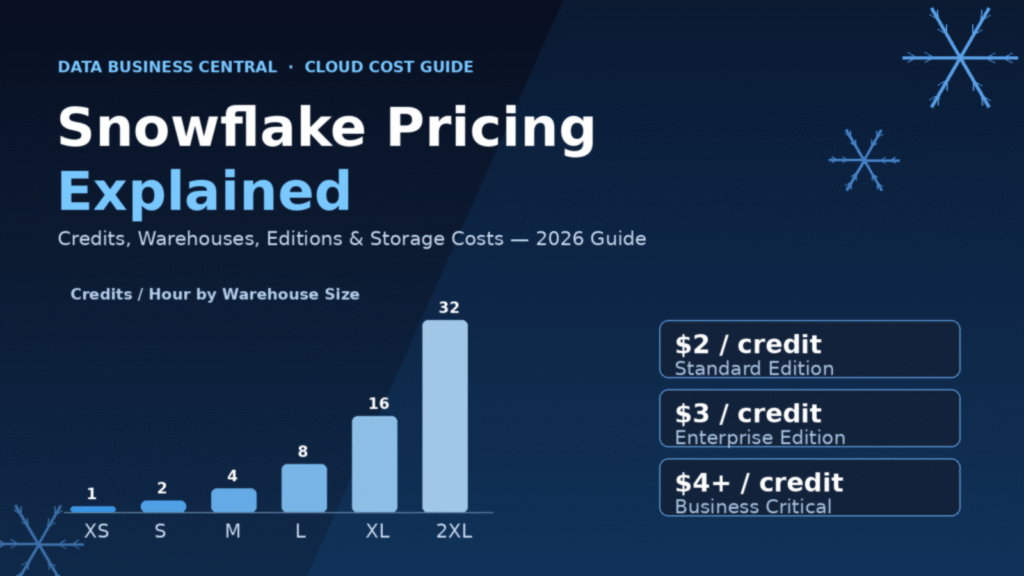
As of mid-2026, published on-demand credit rates for AWS US East (N. Virginia) look roughly like this:
| Edition | Price per Credit (On-Demand) |
|---|---|
| Standard | ~$2.00 |
| Enterprise | ~$3.00 |
| Business Critical | ~$4.00 |
| Virtual Private Snowflake (VPS) | Custom / negotiated (often $5–$6+) |
Non-US regions on any edition typically run 30% to 55% higher than US baseline rates, so a workload that costs $2/credit in Virginia might cost closer to $2.80–$3.10/credit in an EU or APAC region. Region selection alone can be one of the biggest cost levers available to you — often bigger than warehouse right-sizing.
Snowflake bills compute per second, with a 60-second minimum every time a warehouse starts or resumes. That means a five-second query still costs you a full minute of compute. This detail matters enormously once you understand how auto-suspend settings interact with it — more on that shortly.
Virtual Warehouses: Where 80% of Your Bill Lives
Compute is billed through virtual warehouses — independent clusters of compute resources that you spin up to run queries, transformations, and data loads. Warehouses come in T-shirt sizes, and each step up the ladder doubles both the processing power and the credit consumption rate.
| Warehouse Size | Credits per Hour |
|---|---|
| X-Small (XS) | 1 |
| Small (S) | 2 |
| Medium (M) | 4 |
| Large (L) | 8 |
| X-Large (XL) | 16 |
| 2X-Large | 32 |
| 3X-Large | 64 |
| 4X-Large | 128 |
| 5X-Large | 256 |
| 6X-Large | 512 |
This doubling pattern is the single most important thing to internalize about Snowflake pricing. A Medium warehouse costs exactly twice as much per hour as a Small, and exactly half as much as a Large. Bumping a team from Medium to Large “just to be safe” doesn’t add a modest increment to the bill — it doubles that warehouse’s hourly cost, every hour it runs, for as long as nobody notices.
Industry benchmarks suggest virtual warehouse compute accounts for roughly 80% of the average enterprise Snowflake bill. If you’re trying to control costs, warehouse governance is where the leverage is — far more than storage optimization.
A Real Compute Cost Example
Let’s say you run a Medium warehouse (4 credits/hour) on Enterprise edition (~$3/credit) for 8 hours a day, 22 business days a month:
- 4 credits × 8 hours × 22 days = 704 credits/month
- 704 credits × $3.00 = ≈$2,112/month in compute alone
Bump that same workload to a Large warehouse (8 credits/hour) and the same schedule now costs roughly $4,224/month — double, for the exact same query volume, simply because someone chose a bigger box than the workload needed.
Now compare a lean setup: an X-Small warehouse (1 credit/hour) on Standard edition (~$2/credit), running 8 hours a day for a small analytics team:
- 1 credit × 8 hours × 22 days = 176 credits/month
- 176 credits × $2.00 = ≈$352/month
That’s the range Snowflake pricing can span for what might look like a “similar” team from the outside — a few hundred dollars a month versus several thousand — purely based on sizing and edition decisions.
Gen2 Warehouses: Faster, But Not Free
Snowflake has rolled out Generation 2 (Gen2) standard warehouses, which run on faster underlying hardware and include software-level query optimizations. Snowflake’s own benchmarking shows Gen2 running roughly 2.1x faster for core analytics workloads, with even larger gains — up to 4.4x — for heavy DML operations like DELETE, UPDATE, and MERGE.
The catch: Gen2 costs about 1.35x the credit rate of Gen1 on AWS and Google Cloud, and about 1.25x on Azure. It’s only available for X-Small through 4X-Large sizes. Whether Gen2 saves you money depends entirely on whether your workload finishes fast enough to offset the higher per-hour rate. For DML-heavy pipelines, it frequently does. For light, sporadic query workloads, the gains may not be worth the premium.
Snowpark-Optimized Warehouses for ML Workloads
If your team runs Python-based machine learning workloads or large model training inside Snowflake, Snowpark-optimized warehouses give you up to 16 times the memory of a standard warehouse at the same size tier. That extra RAM comes at a cost: roughly 1.5x the standard credit consumption rate. A Medium Snowpark-optimized warehouse burns about 6 credits/hour instead of 4, which on Enterprise edition works out to roughly $18/hour.
The 60-Second Minimum and Why Auto-Suspend Matters So Much
Because every warehouse start or resume carries a 60-second minimum charge, the way you configure auto-suspend has an outsized effect on your bill. Auto-suspend automatically shuts a warehouse down after a defined period of inactivity — commonly five minutes.
Here’s the tension: set auto-suspend too aggressively (say, 10 seconds) on a warehouse that gets frequent, bursty queries, and you’ll trigger the 60-second minimum charge over and over as the warehouse constantly restarts. Set it too loosely, and the warehouse sits idle, burning credits for work it isn’t doing.
Teams that fail to configure auto-suspend at all often discover the most expensive mistake in Snowflake pricing: a single X-Small warehouse running 24/7 with no suspend logic can cost $1,460 to $2,260 a month on Standard edition alone — for a workload that may only need a few active hours a day. FinOps teams commonly report that fixing auto-suspend and right-sizing warehouses cuts Snowflake bills by 40% to 60% within the first month of active governance.
Multi-Cluster Warehouses and Concurrency Scaling
On Enterprise edition and above, you can enable multi-cluster warehouses, which automatically add clusters when concurrent query volume spikes and scale back down when it subsides. This solves a real problem — queuing during peak usage — but it multiplies credit consumption proportionally. Each additional cluster costs roughly the same as the base cluster, so a warehouse that scales out to three clusters during a busy morning triples its hourly credit burn for that window. It’s a powerful feature, but one that needs monitoring, not “set and forget” defaults.
Snowflake Editions: What You Get for the Premium
Snowflake sells four edition tiers, and the edition you choose affects both your feature set and your per-credit price.
Standard Edition covers core data warehousing: unlimited users, automatic scaling, standard security, and support for structured and semi-structured data. It includes only 1-day Time Travel (the ability to query or restore historical data). It’s a reasonable fit for smaller teams, non-production workloads, or budget-conscious analytics without regulatory requirements.
Enterprise Edition is where most production SaaS and analytics workloads live. It adds multi-cluster warehouses, materialized views, column-level security, and extends Time Travel up to 90 days. The roughly 50% premium over Standard buys real operational flexibility — multi-cluster scaling alone can be the difference between a fast dashboard and a queue of frustrated analysts during peak hours.
Business Critical Edition adds HIPAA compliance support, Tri-Secret Secure customer-managed encryption keys, enhanced network security, and private connectivity options. It’s the default choice for healthcare, financial services, and any organization handling regulated data such as PCI-DSS payment information. Business Critical typically costs $4.00 to $5.00 per credit on-demand — a real premium, but often a compliance requirement rather than an optional upgrade.
Virtual Private Snowflake (VPS) provides a fully isolated environment with dedicated infrastructure and metadata store, aimed at government agencies and organizations needing complete tenant isolation. VPS pricing is negotiated directly with Snowflake and is reserved for the most security-sensitive deployments.
| Edition | Typical On-Demand Rate | Best For |
|---|---|---|
| Standard | ~$2.00/credit | Small teams, dev/test, budget-conscious analytics |
| Enterprise | ~$3.00/credit | Most production workloads |
| Business Critical | ~$4.00–$5.00/credit | Regulated industries (healthcare, finance, government) |
| VPS | Custom / negotiated | Maximum isolation, sovereign-cloud requirements |
A useful rule of thumb from FinOps practitioners: edition and region choice can create a 2.5x to 2.7x spread in effective credit price — from roughly $2.00/credit on Standard in US East up to $5.40+/credit on VPS in EU regions. That spread often outweighs the impact of warehouse sizing decisions, which is why it’s worth revisiting your edition choice before assuming compute optimization alone will fix a bloated bill.
Storage Costs: The Smaller, Steadier Meter
Compared to compute, storage pricing in Snowflake is comparatively simple — and comparatively cheap. You pay for the daily average of compressed terabytes stored per month, and Snowflake’s native compression typically shrinks raw data by 3x to 5x before it’s billed.
On-demand storage runs at roughly $23 per compressed TB per month on AWS US East. That number varies slightly by cloud provider and region — note that on Google Cloud, storage pricing is flat across all capacity commitment tiers, meaning volume discounts don’t reduce GCP storage rates the way they might on AWS or Azure.
A few storage details that catch teams off guard:
- Time Travel data (which lets you query historical table states) and Fail-safe data (a 7-day recovery window after Time Travel expires) both count toward your storage bill. Extending Time Travel from 1 day to 90 days on Enterprise edition can meaningfully increase storage costs for high-churn tables.
- Hybrid Tables, Snowflake’s row-oriented format for transactional workloads, are priced separately from standard columnar storage.
- Azure currently offers only a “Cool Tier” for archive storage; the “Cold Tier” available on AWS isn’t offered there.
For most organizations, storage ends up being a small fraction of the total bill — often single-digit percentages — while compute dominates. That’s precisely why cost-conscious teams focus their optimization energy on warehouses rather than storage tiering.
The Cloud Services Layer: A Free (Mostly) Meter
Every Snowflake account includes a Cloud Services layer that handles authentication, query parsing, optimization, and metadata management. This layer consumes credits too — but Snowflake only bills you for the portion that exceeds 10% of your daily warehouse compute consumption. For most accounts, this stays under the free threshold and never appears as a line item. It becomes visible mainly in accounts with unusually complex metadata operations or very light warehouse usage relative to query planning overhead.
Hidden Costs That Rarely Show Up in Sales Conversations
Beyond the headline compute and storage numbers, several charges tend to surprise new customers:
- Data transfer / egress fees — moving data between Snowflake regions or between cloud providers incurs per-GB charges that aren’t part of the credit system at all.
- Serverless features — Snowpipe continuous data loading, automatic clustering, materialized view maintenance, and Search Optimization Service all consume credits independently of your warehouses.
- Resize charges — resizing a running warehouse mid-query (say, from Medium to Large) triggers an additional one-minute charge at the new, higher rate before per-second billing resumes.
- Cortex AI features — Snowflake’s built-in AI/ML functions carry their own consumption-based pricing on top of standard compute.
None of these are enormous individually, but stacked together they explain why two companies with seemingly identical data volumes can end up with wildly different invoices.
Real-World Monthly Cost Ranges
To ground all of this in practical numbers, here’s how actual Snowflake spend tends to break down by team size and workload intensity, based on 2026 usage benchmarks:
| Profile | Typical Monthly Spend |
|---|---|
| Small analytics team (5 users, light workloads, Standard edition) | $250–$500 |
| Mid-size data team (regular ETL, Enterprise edition) | $2,000–$10,000 |
| Marketing analytics team (~5TB data) | $1,500–$3,000 |
| Retail company (~50TB data, daily ETL) | $8,000–$12,000 |
| Large enterprise (complex pipelines, Business Critical) | $10,000–$50,000+ |
The median Snowflake customer reportedly pays in the neighborhood of $95,000–$100,000 per year, though this varies enormously by industry, data volume, and how disciplined the organization is about warehouse governance.
Capacity Discounts: Negotiating Below List Price
Most serious Snowflake customers don’t pay on-demand rates at all. Snowflake offers Capacity pricing — pre-purchased annual credit commitments — that unlock meaningful discounts off the on-demand rate:
- ~$1 million annual commitment: roughly 10–18% discount
- ~$3 million annual commitment: roughly 18–28% discount
- ~$10 million annual commitment: roughly 28–40% discount
The tradeoff is commitment risk: if your actual usage comes in under the contracted amount, you’ve effectively pre-paid for credits you never used. Snowflake contracts also tend to auto-renew, so it’s worth calendaring a renewal review well before the term ends rather than letting it roll over on old assumptions about usage.
How Snowflake Pricing Compares to Alternatives
Snowflake’s consumption model isn’t the only approach to cloud data warehouse pricing. Google BigQuery, for example, bills on-demand by the terabyte of data scanned per query, or through slot-hour capacity commitments — no warehouse sizing to manage, but wide table scans can get expensive fast. Databricks takes a similar consumption-based approach but is often more cost-effective for heavy machine learning workloads, given its architecture around Spark-based compute.
For organizations running primarily SQL-based analytics with strong governance needs, Snowflake’s ease of operation and mature security tooling frequently justifies its premium over these alternatives. For ML-heavy shops running constant training jobs, the economics can tilt toward Databricks. The right choice depends far more on workload shape than on any single price list comparison.
Practical Tips to Keep Your Snowflake Bill Under Control
- Right-size before you scale up. Because each warehouse size doubles the cost, always test whether a smaller size meets your latency needs before assuming you need more power.
- Set auto-suspend intelligently. A 5-minute suspend window is a reasonable starting point for most analytical workloads — short enough to stop waste, long enough to avoid re-triggering the 60-second minimum on every query.
- Separate warehouses by workload. Don’t let a heavy ETL job and a lightweight dashboard share the same warehouse — isolate them so you can size each appropriately.
- Monitor multi-cluster scaling. Set sensible minimum and maximum cluster counts rather than leaving concurrency scaling unbounded.
- Reassess your edition annually. Features you needed at signup may no longer justify the premium — or you may now need Business Critical for compliance reasons you didn’t have before.
- Review Time Travel retention per table. Extending retention to 90 days for every table, including high-churn staging tables, quietly inflates storage costs.
- Negotiate Capacity pricing once usage stabilizes. Don’t commit to a multi-year Capacity deal until you have a few months of stable, predictable on-demand usage data to base it on.
Frequently Asked Questions
How much does Snowflake cost per month for a small team? A small analytics team running an X-Small warehouse on Standard edition for a few hours a day typically spends $250–$500 per month, including light storage costs.
What is a Snowflake credit worth in dollars? It depends on your edition, cloud provider, and region. On AWS US East, Standard edition credits run roughly $2.00, Enterprise around $3.00, and Business Critical around $4.00–$5.00.
Does Snowflake charge for idle warehouses? No — as long as auto-suspend is configured, a warehouse stops consuming credits once it’s idle. Without auto-suspend, a warehouse left running continues billing indefinitely.
Is Snowflake storage expensive? Generally not, relative to compute. Storage runs around $23 per compressed terabyte per month on AWS US East, and compute typically accounts for roughly 80% of a total Snowflake bill.
Can I reduce Snowflake costs without losing performance? Yes. Most cost reductions come from governance — right-sizing warehouses, tightening auto-suspend, isolating workloads, and reviewing Time Travel retention — rather than from sacrificing query speed.
Final Thoughts
Snowflake pricing rewards attention and punishes neglect. The platform’s consumption-based model can be remarkably cost-efficient for teams that actively manage warehouse sizing, auto-suspend settings, and edition selection — and remarkably expensive for teams that treat it like a flat-fee SaaS subscription and never look back. Understanding the three core meters — compute credits, storage, and the cloud services layer — along with the real-world multipliers of edition, region, and warehouse size, puts you in a position to forecast costs accurately and negotiate from a position of knowledge rather than guesswork.
Whether you’re evaluating Snowflake for the first time or trying to bring an existing bill back under control, the numbers in this guide give you a realistic, data-grounded starting point for that conversation.
