There is a performance problem buried inside every synchronous multi-agent system, and most developers only discover it once their pipeline is already in production.
An agent that makes five tool calls—web search, database lookup, API request, calculation, and a knowledge base retrieval—waits for each one to complete before starting the next. At 2 seconds per call, that is 10 seconds of wall-clock time. The model sits idle while the network responds. The user waits. The infrastructure cost accumulates for every idle millisecond.
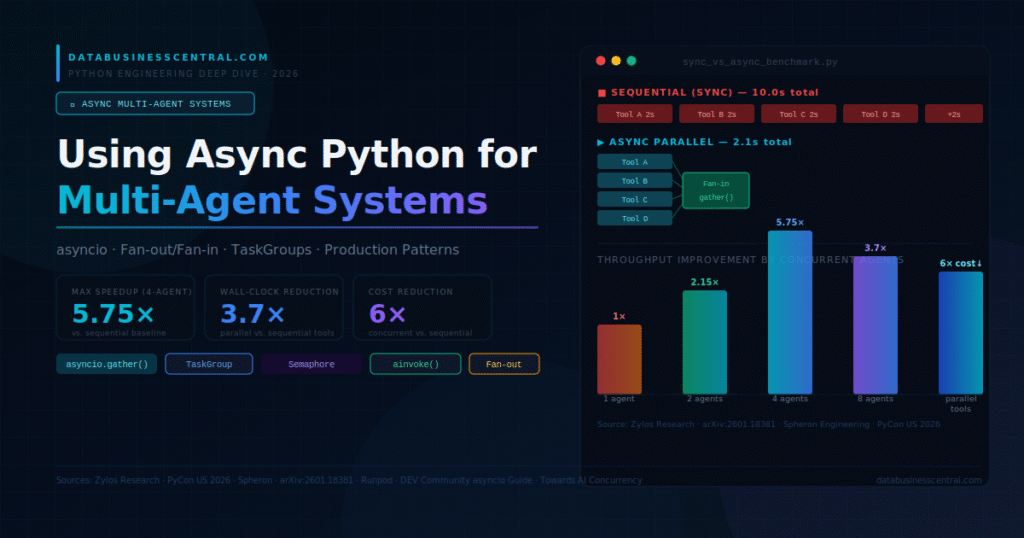
<cite index=”30-1″>The dominant bottleneck in production AI agent systems in 2026 is no longer model inference speed—it is sequential tool execution. Parallel execution collapses cumulative latency to the latency of the single slowest call. Benchmarks across frameworks show consistent 1.8x–3.7x wall-clock speedups and up to 6x cost reductions when agents schedule independent work concurrently.</cite>
This is exactly what Python’s asyncio solves. And in the context of multi-agent systems—where dozens of specialized agents may be reasoning, tool-calling, and communicating simultaneously—async architecture is not an optimization. It is the baseline requirement for any system that performs acceptably at scale.
Why Async Matters Specifically for Multi-Agent Pipelines
Single-agent, single-task workflows can often tolerate synchronous code. The latency is predictable, the bottlenecks are visible, and the user expectation is usually a single response to a single question.
Multi-agent systems break every one of those assumptions.
<cite index=”31-1″>Building AI agents that can reason, plan, and execute tasks requires orchestrating dozens of concurrent LLM calls, tool invocations, and external API requests.</cite> When a coordinator agent fans out subtasks to five specialist agents—each of which makes multiple tool calls—the sequential execution model compounds latency at every level of the hierarchy. A five-agent system with three tool calls each, executing synchronously, pays 15 network round-trips in serial. The same system with proper async architecture pays the latency of the slowest single call.
<cite index=”35-1″>Empirical evaluation using a representative benchmark dataset demonstrates notable acceleration. Relative to sequential execution, a configuration with two agents delivers a 2.15× throughput improvement. Expanding to four agents raises throughput to a 5.75× speed increase—a result that exceeds the nominal theoretical upper bound of four times, because async scheduling eliminates idle wait time between calls.</cite>
That 5.75× figure at four agents is the number that matters for production system design. It means an async four-agent pipeline completes a task in roughly the same time a synchronous single-agent pipeline completes one step. The economic and user-experience implications are substantial.
The three things Python’s async ecosystem enables in multi-agent systems that synchronous code cannot match:
Parallel tool execution. Independent tools—search, database, API—fire simultaneously. The agent waits only for the slowest, not the sum.
Concurrent agent coordination. Multiple agents reason and act simultaneously without blocking each other.
Non-blocking streaming. LLM responses stream to users as they generate, while other agents continue working in parallel.
The asyncio Fundamentals Every Agent Developer Must Know
Before building multi-agent async systems, a handful of primitives form the entire foundation. Every pattern in this guide is a composition of these.
async def and await
An async def function is a coroutine. It does not run when called—it returns a coroutine object. await hands control back to the event loop while waiting for the result, allowing other coroutines to run. This is the difference between blocking and non-blocking I/O.
import asyncio
from langchain_anthropic import ChatAnthropic
from langchain_core.messages import HumanMessage

llm = ChatAnthropic(model="claude-sonnet-4-6", temperature=0)

# ❌ Synchronous — blocks the thread while waiting for the LLM response
def sync_call(prompt: str) -> str:
    response = llm.invoke([HumanMessage(content=prompt)])
    return response.content

# ✅ Async — yields control while waiting; other coroutines can run
async def async_call(prompt: str) -> str:
    response = await llm.ainvoke([HumanMessage(content=prompt)])
    return response.content
The .ainvoke() method is the async counterpart of .invoke() across the entire LangChain and LangGraph ecosystem. Every client, tool, and chain exposes an ainvoke, astream, or arun variant. Always use the async variant in multi-agent systems.
asyncio.gather() — The Fan-Out/Fan-In Primitive
asyncio.gather() is the most important single function in async multi-agent development. It fires multiple coroutines simultaneously and collects results when all complete. This is the fan-out/fan-in pattern that drives the majority of production agent parallelism.
python
import asyncio
from langchain_anthropic import ChatAnthropic
from langchain_core.messages import HumanMessage

llm = ChatAnthropic(model="claude-sonnet-4-6", temperature=0)

async def run_specialist_agent(prompt: str, agent_role: str) -> str:
    """Single specialist agent coroutine."""
    system = f"You are a specialist in {agent_role}. Be concise and precise."
    response = await llm.ainvoke([
        HumanMessage(content=f"{system}\n\nTask: {prompt}")
    ])
    return response.content

async def run_parallel_agents(task: str) -> dict:
    """Fan out to four specialist agents simultaneously."""
    roles = {
        "market_researcher": "enterprise AI market research",
        "data_analyst":      "quantitative data analysis",
        "risk_assessor":     "technology risk assessment",
        "strategist":        "enterprise technology strategy"
    }

    # All four LLM calls fire at the same time
    # Total latency = slowest single call, not the sum of all four
    results = await asyncio.gather(*[
        run_specialist_agent(task, role)
        for role in roles.values()
    ])

    return dict(zip(roles.keys(), results))

# Run it
async def main():
    task = "Assess the enterprise adoption trajectory of multi-agent AI systems in 2026"
    results = await run_parallel_agents(task)
    for role, analysis in results.items():
        print(f"\n--- {role.upper()} ---\n{analysis}")

asyncio.run(main())
<cite index=”29-1″>Async LLM pipelines enable parallel processing, allowing multiple tasks to execute concurrently. Benchmarks from 2026 show that async-first architectures process workloads with 90% fewer resources compared to synchronous alternatives.</cite>
asyncio.TaskGroup — Structured Concurrency (Python 3.11+)
TaskGroup, introduced in Python 3.11, is the modern replacement for raw asyncio.gather() in production code. Where gather() silently swallows exceptions from individual tasks by default, TaskGroup propagates them correctly, cancels all sibling tasks on failure, and makes error handling explicit.
import asyncio

async def run_agents_with_taskgroup(prompts: list[str]) -> list[str]:
    """Production pattern: structured concurrency with proper error handling."""
    results = []

    async with asyncio.TaskGroup() as tg:
        tasks = [
            tg.create_task(async_call(prompt))
            for prompt in prompts
        ]

    # If any task raises, TaskGroup cancels all siblings and re-raises
    # This is what you want in production — no silent failures
    results = [task.result() for task in tasks]
    return results
Use TaskGroup in production multi-agent code. Use gather() in quick scripts and prototypes where the simpler API is more readable. The key distinction: TaskGroup enforces structured concurrency—tasks cannot outlive their context—which prevents the resource leak patterns that cause production incidents.
asyncio.Semaphore — Rate Limiting for LLM APIs
<cite index=”34-1″>Concurrent LLM calls handle bursts efficiently but risk hitting API rate limits faster. Use asyncio Semaphore to limit concurrent requests without sacrificing the async model.</cite>
Every LLM provider enforces rate limits. A naive asyncio.gather() that fires 50 simultaneous requests will saturate your token budget and return 429 errors on most of them. Semaphore solves this elegantly—it allows up to N concurrent coroutines and queues the rest without blocking the event loop.
python
import asyncio
from langchain_anthropic import ChatAnthropic
from langchain_core.messages import HumanMessage

llm = ChatAnthropic(model="claude-sonnet-4-6", temperature=0)
# Respect API rate limits: max 10 concurrent LLM requests
RATE_LIMIT = asyncio.Semaphore(10)

async def rate_limited_agent_call(prompt: str, agent_id: int) -> dict:
    async with RATE_LIMIT:  # Blocks here if 10 requests are already in flight
        print(f"Agent {agent_id} acquired semaphore, calling LLM...")
        response = await llm.ainvoke([HumanMessage(content=prompt)])
        return {"agent_id": agent_id, "result": response.content}

async def run_agent_fleet(tasks: list[str]) -> list[dict]:
    """Run up to 10 agents concurrently, queue the rest."""
    coroutines = [
        rate_limited_agent_call(task, i)
        for i, task in enumerate(tasks)
    ]
    return await asyncio.gather(*coroutines)
For 1,000+ users at scale, the hybrid approach—concurrent API calls with semaphore rate limiting, combined with parallel local computation—reduces response times by 5 to 10 times versus sequential execution.
Building a Full Async Multi-Agent Pipeline with LangGraph
LangGraph’s async execution model runs every node as a coroutine. The ainvoke() method on compiled graphs handles the event loop, making async multi-agent systems composable without manual loop management.
python
import asyncio
from langgraph.graph import StateGraph, END
from langgraph.checkpoint.postgres.aio import AsyncPostgresSaver
from langchain_anthropic import ChatAnthropic
from langchain.tools import tool
from pydantic import BaseModel
from typing import Annotated
import operator

# Async LLM client
llm = ChatAnthropic(model="claude-sonnet-4-6", temperature=0)

# Async tool definitions
@tool
async def async_web_search(query: str) -> str:
    """Search the web asynchronously. Use for current data and statistics."""
    import httpx
    async with httpx.AsyncClient(timeout=10.0) as client:
        # In production: replace with a real search API
        response = await client.get(
            "https://api.search.example.com/search",
            params={"q": query}
        )
        return response.text[:1500]

@tool
async def async_database_query(query: str) -> str:
    """Query the enterprise database asynchronously."""
    import asyncpg
    conn = await asyncpg.connect(DATABASE_URL)
    try:
        result = await conn.fetch(query)
        return str(result)
    finally:
        await conn.close()

# Bind async tools to the LLM
tools = [async_web_search, async_database_query]
llm_with_tools = llm.bind_tools(tools)

# Agent state
class AsyncAgentState(BaseModel):
    messages: Annotated[list, operator.add]
    iteration_count: int = 0
    max_iterations: int = 10

# Async reasoning node
async def async_reasoning_node(state: AsyncAgentState) -> dict:
    """Non-blocking LLM call — yields to event loop while waiting."""
    response = await llm_with_tools.ainvoke(state.messages)
    return {
        "messages": [response],
        "iteration_count": state.iteration_count + 1
    }

# Routing logic (sync — no I/O, no need to be async)
def should_continue(state: AsyncAgentState) -> str:
    if state.iteration_count >= state.max_iterations:
        return "end"
    last = state.messages[-1]
    if hasattr(last, "tool_calls") and last.tool_calls:
        return "act"
    return "end"

# Build the async graph
from langgraph.prebuilt import ToolNode

graph = StateGraph(AsyncAgentState)
graph.add_node("reason", async_reasoning_node)   # Async node
graph.add_node("act", ToolNode(tools))           # ToolNode handles async tools automatically

graph.set_entry_point("reason")
graph.add_conditional_edges("reason", should_continue, {"act": "act", "end": END})
graph.add_edge("act", "reason")

# Async checkpointer — durable state without blocking the event loop
async def create_agent():
    checkpointer = await AsyncPostgresSaver.from_conn_string(DATABASE_URL)
    return graph.compile(checkpointer=checkpointer)
The critical architectural point: AsyncPostgresSaver uses async database connections. A synchronous checkpointer in an async graph blocks the event loop on every state save—negating much of the latency benefit of async tool execution. Match the async boundary consistently at every layer.
The Parallel Tool Execution Pattern
This pattern is the single highest-leverage async technique for agent performance. When an agent needs results from multiple independent tools, fire them all at once.
python
import asyncio
from langchain_core.messages import ToolMessage
from langchain_anthropic import ChatAnthropic

llm = ChatAnthropic(model="claude-sonnet-4-6", temperature=0)

async def execute_tools_in_parallel(tool_calls: list, tools_map: dict) -> list:
    """
    Fan-out: Execute all independent tool calls simultaneously.
    Fan-in: Collect all results when the slowest completes.

    Latency = max(individual tool latencies)
    vs. sequential: Latency = sum(all tool latencies)
    """
    async def run_single_tool(tool_call) -> ToolMessage:
        tool_fn = tools_map[tool_call["name"]]
        # Handle both sync and async tools uniformly
        if asyncio.iscoroutinefunction(tool_fn):
            result = await tool_fn(**tool_call["args"])
        else:
            # Run sync tools in executor to avoid blocking the event loop
            loop = asyncio.get_event_loop()
            result = await loop.run_in_executor(None, tool_fn, **tool_call["args"])
        return ToolMessage(
            content=str(result),
            tool_call_id=tool_call["id"]
        )

    # All tool calls fire simultaneously regardless of count
    tool_messages = await asyncio.gather(*[
        run_single_tool(tc) for tc in tool_calls
    ])
    return list(tool_messages)

async def agent_step_with_parallel_tools(state, tools_map):
    """One agent step with fully parallel tool execution."""
    response = await llm.ainvoke(state.messages)

    if not response.tool_calls:
        return response  # Done — no tool calls needed

    # Fan out all tool calls simultaneously (the key performance gain)
    tool_results = await execute_tools_in_parallel(response.tool_calls, tools_map)

    # Fan in — all results collected, continue reasoning
    return {"messages": state.messages + [response] + tool_results}
<cite index=”30-1″>A study of production multi-agent pipelines found the fan-out/fan-in pattern reduces wall-clock time by 36–50% in common content and research workflows.</cite> For a research agent that typically calls search, database, and knowledge base in sequence, that 36–50% reduction is the difference between a 6-second response and a 3-second one—a gap that directly affects user satisfaction and retry rates.
Handling the Three Most Common Async Production Failures
Failure 1: Blocking the Event Loop with Sync Code
The most common async mistake in production agent systems: a synchronous function called directly inside an async coroutine.
python
import asyncio
import time

# ❌ WRONG — blocks the event loop for 2 seconds
# While sleeping, NO other coroutines can run
async def broken_agent_step():
    time.sleep(2)                    # This blocks everything
    response = requests.get(url)     # This also blocks everything
    return response.text

# ✅ CORRECT — yields to event loop, others run during the wait
async def correct_agent_step():
    await asyncio.sleep(2)           # Non-blocking sleep
    async with httpx.AsyncClient() as client:
        response = await client.get(url)  # Non-blocking HTTP
    return response.text

# ✅ FOR UNAVOIDABLE SYNC CODE — use run_in_executor
async def legacy_sync_wrapper(sync_function, *args):
    loop = asyncio.get_event_loop()
    return await loop.run_in_executor(None, sync_function, *args)
<cite index=”22-1″>A common pitfall is blocking the event loop with synchronous LLM clients. Strategies for mixing async and sync code in production systems are critical knowledge for agent developers.</cite>
Failure 2: Unhandled Exceptions in Concurrent Tasks
python
import asyncio

# ❌ WRONG — exception in task_b silently disappears with return_exceptions=False
async def fragile_parallel_run():
    results = await asyncio.gather(
        task_a(), task_b(),  # If task_b raises, task_a result may be lost
    )

# ✅ CORRECT — TaskGroup cancels all siblings on any exception
async def robust_parallel_run():
    results = {}
    try:
        async with asyncio.TaskGroup() as tg:
            a_task = tg.create_task(task_a())
            b_task = tg.create_task(task_b())
        results = {"a": a_task.result(), "b": b_task.result()}
    except* ValueError as eg:
        # ExceptionGroup handling (Python 3.11+)
        for exc in eg.exceptions:
            print(f"Agent failed with ValueError: {exc}")
    return results
Failure 3: Missing Timeouts on Tool Calls
Network calls to external APIs can hang indefinitely. An agent waiting for a stalled HTTP request holds a semaphore slot, blocks dependent downstream steps, and may cause cascading delays across the entire pipeline.
python
import asyncio
import httpx

async def resilient_tool_call(url: str, timeout_seconds: float = 5.0) -> str:
    """Tool call with timeout and graceful fallback."""
    try:
        async with asyncio.timeout(timeout_seconds):          # Python 3.11+
            async with httpx.AsyncClient() as client:
                response = await client.get(url)
                return response.text[:2000]
    except TimeoutError:
        return f"Tool timed out after {timeout_seconds}s. Proceeding without this result."
    except httpx.HTTPError as e:
        return f"Tool HTTP error: {str(e)}. Proceeding without this result."
Always return a meaningful error string rather than raising from tool functions. The agent needs something to reason about when a tool fails—an exception surfaces no information about what went wrong or how to proceed.
Framework Async Support: What to Expect in 2026
<cite index=”21-1″>LlamaIndex Workflows use an event-driven, async-first architecture to orchestrate multi-step AI processes, supporting parallel execution of tasks without requiring predefined graph paths. AutoGen version 0.4 introduced a redesigned asynchronous, event-driven architecture with Core, AgentChat, and Extensions layers where every participant communicates via event-driven messages rather than synchronous function calls.</cite>
LangGraph exposes ainvoke, astream, and astream_events on compiled graphs, with an AsyncPostgresSaver for durable async checkpointing. CrewAI supports async execution through its kickoff_async() method, enabling multiple crews to run simultaneously with asyncio.gather(). Pydantic AI is fully async-native—the agent.run() method is a coroutine from the ground up.
The pattern for all frameworks is identical in structure: use ainvoke instead of invoke, use AsyncPostgresSaver or equivalent for checkpointing, define tools as async def, and use asyncio.gather() or TaskGroup at the orchestration layer.
Production Deployment: Connecting Async Agents to FastAPI
python
from fastapi import FastAPI
from pydantic import BaseModel
import asyncio, uuid

app = FastAPI(title="Async Multi-Agent API")

# Global semaphore: max 20 concurrent agent pipelines
# Prevents memory exhaustion under traffic bursts
PIPELINE_SEMAPHORE = asyncio.Semaphore(20)

class MultiAgentRequest(BaseModel):
    task: str
    user_id: str
    agent_count: int = 4  # How many specialist agents to fan out to

@app.post("/agents/run")
async def run_multi_agent_pipeline(request: MultiAgentRequest):
    async with PIPELINE_SEMAPHORE:
        session_id = str(uuid.uuid4())
        # Fan out to N specialist agents asynchronously
        results = await asyncio.gather(*[
            run_specialist_agent(request.task, f"specialist_{i}")
            for i in range(request.agent_count)
        ])
        # Synthesise results with a coordinator agent
        synthesis = await coordinator_agent(results)
        return {
            "session_id": session_id,
            "specialist_results": results,
            "synthesis": synthesis
        }

@app.get("/health")
async def health():
    return {"status": "healthy", "async": True}
FastAPI is built on asyncio and Starlette—every route handler is a coroutine by default. This means zero overhead in moving from synchronous to async agent code. The async with PIPELINE_SEMAPHORE guard prevents the case where a traffic spike spawns more concurrent agent pipelines than the infrastructure can sustain.
<cite index=”36-1″>At 10 to 50 concurrent agents with parallel tool execution, 16 to 24 vCPUs per GPU is the right infrastructure target. Each agent thread consumes a CPU core during tool dispatch and state graph evaluation. A 10-agent pipeline making 3 tool calls per step needs approximately 30 simultaneous CPU threads serviced per inference round.</cite> Right-sizing infrastructure is as important as right-sizing code for production async performance.
When to Use Async and When Not To
Async Python is not always the right answer. The performance gains from asyncio are specific to I/O-bound workloads—network calls, database queries, file reads, external API requests. These are exactly the operations that dominate multi-agent systems: every LLM call is a network request, every tool call is an API request, every state save is a database write.
For CPU-bound workloads—heavy computation, data transformation, embedding generation over large batches—asyncio provides no benefit and adds complexity. Use multiprocessing or concurrent.futures.ProcessPoolExecutor for CPU-bound work and reserve asyncio for I/O-bound agent coordination.
The practical rule: if your agent’s time is spent waiting for responses (LLM, APIs, databases), async gives you the 3.7x to 5.75x speedup benchmarks show. If your agent’s time is spent computing, async is overhead without benefit.
The Performance Summary
Sequential multi-agent systems pay the cumulative latency of every step. Async multi-agent systems pay the latency of the slowest step.
For a research pipeline with four specialist agents, each making three tool calls at 500ms each, sequential execution costs 6 seconds. Async execution with asyncio.gather() costs the latency of the slowest single call—roughly 600ms. That is a 10x wall-clock reduction from a pattern change, not a hardware upgrade.
<cite index=”30-1″>Benchmarks across production frameworks show consistent 1.8x–3.7x wall-clock speedups and up to 6x cost reductions when agents schedule independent work concurrently.</cite> The 6x cost reduction comes from dramatically lower token consumption per time unit—async pipelines complete work before the context window fills with intermediate reasoning, reducing total tokens billed.
The three patterns that account for most of those gains: asyncio.gather() for parallel tool execution, TaskGroup for structured multi-agent coordination, and Semaphore for rate-limit-safe concurrent LLM calls. Master these three, and every multi-agent system you build will perform at a level that synchronous code cannot reach.

1 thought on “Using Async Python for Multi-Agent Systems in 2026”
Pingback: Implementing RAG with Python: A Complete 2026 Guide