Two years ago, most enterprise AI discussions ended with a dashboard. A model generated a recommendation, a human read it, a human acted on it. The model was advisory, not operational.
That architecture is being retired fast.
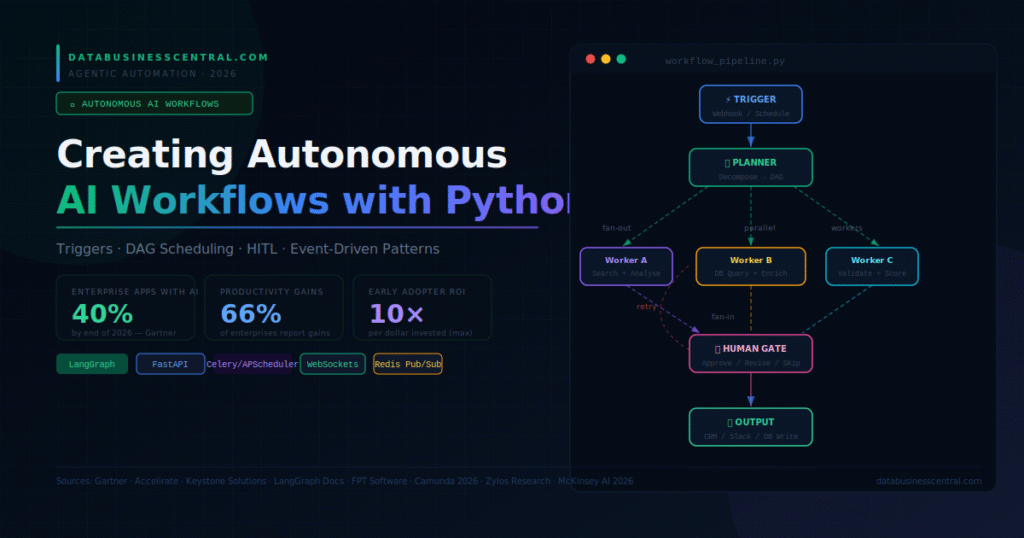
<cite index=”38-1″>40% of enterprise applications are expected to include AI agents by 2026. 79% of companies report that AI agents are already being adopted within their organizations. 66% of companies using AI agents have seen measurable productivity gains. 15% of day-to-day business decisions could soon be made autonomously.</cite>
<cite index=”41-1″>Early adopters report ROI between 1.7x and 10x per dollar invested. 93% of business leaders agree that scaling AI agents within the next year will be a key competitive advantage.</cite>
The shift is architectural. Modern autonomous AI workflows do not wait for human prompts. They wake up on schedules, respond to webhooks, consume event streams, plan multi-step task graphs, execute in parallel, and hand off to humans only at decisions that genuinely require human judgment. Python is the runtime where most of this is being built — and this guide covers the complete engineering blueprint, from first trigger to production deployment.
What Makes a Workflow Truly Autonomous
The word “autonomous” carries a lot of weight. For practical engineering, it means five specific capabilities that separate autonomous AI workflows from sophisticated chatbots:
Self-initiation. The workflow starts without a human typing a message. A schedule fires, a webhook arrives, a database change publishes to a queue. The workflow wakes up.
Goal decomposition. Given a high-level objective, the workflow breaks it into subtasks, determines dependencies, and schedules execution — without a human writing the task list.
Parallel execution. Independent subtasks run concurrently. The workflow does not serialize work that does not need to be serial.
Conditional routing. The workflow makes decisions based on intermediate outputs — routing to different agents, escalating to humans, retrying on failure — without hardcoded rules for every case.
Durable state. If the process is interrupted at step 7 of 12, it resumes from step 7, not step 1. State survives restarts, retries, and long waits for external signals.
<cite index=”54-1″>LangGraph models time as a first-class concern, allowing pauses, retries, event-driven triggers, and long-running state management. In domains like insurance, procurement, finance, and legal, LangGraph can orchestrate complex, semi-autonomous workflows more naturally than legacy BPM tools.</cite>
Building all five capabilities requires composing Python’s scheduling, messaging, async, and state management ecosystems around a core orchestration framework. The sections that follow cover each layer.
Layer 1: Triggers — How Autonomous Workflows Start
An autonomous workflow is only truly autonomous if it can start itself. There are four trigger patterns in production Python systems in 2026.
Scheduled Triggers with APScheduler
For workflows that run on a fixed cadence — nightly reports, hourly data syncs, weekly reconciliations:
from apscheduler.schedulers.asyncio import AsyncIOScheduler
from apscheduler.triggers.cron import CronTrigger
from apscheduler.triggers.interval import IntervalTrigger
import asyncio

scheduler = AsyncIOScheduler()

# Cron-style: every weekday at 08:30
scheduler.add_job(
    run_morning_report_workflow,
    CronTrigger(day_of_week="mon-fri", hour=8, minute=30),
    id="morning_report",
    replace_existing=True
)

# Interval: every 15 minutes
scheduler.add_job(
    run_data_sync_workflow,
    IntervalTrigger(minutes=15),
    id="data_sync"
)

async def main():
    scheduler.start()
    print("Autonomous scheduler running. Workflows fire on schedule.")
    try:
        await asyncio.Event().wait()  # Run indefinitely
    finally:
        scheduler.shutdown()

asyncio.run(main())
Webhook Triggers with FastAPI
For workflows that start when an external system fires an event — new CRM record, Stripe payment, GitHub push, form submission:
python
from fastapi import FastAPI, BackgroundTasks, HTTPException
from pydantic import BaseModel
import hmac, hashlib, json

app = FastAPI()

class WorkflowTriggerPayload(BaseModel):
    event_type: str
    source_system: str
    payload: dict
    workflow_id: str | None = None

@app.post("/webhooks/trigger")
async def handle_webhook(
    request: WorkflowTriggerPayload,
    background_tasks: BackgroundTasks
):
    """Receive external event and launch appropriate workflow asynchronously."""
    # Route to the right workflow based on event type
    workflow_map = {
        "new_lead":          run_lead_qualification_workflow,
        "invoice_received":  run_invoice_processing_workflow,
        "support_ticket":    run_ticket_triage_workflow,
        "data_anomaly":      run_anomaly_investigation_workflow,
    }

    workflow_fn = workflow_map.get(request.event_type)
    if not workflow_fn:
        raise HTTPException(status_code=400, detail=f"Unknown event type: {request.event_type}")

    # Launch in background — respond immediately, don't block the webhook caller
    background_tasks.add_task(workflow_fn, request.payload)
    return {"status": "accepted", "event": request.event_type}
Event Stream Triggers with Redis Pub/Sub
For high-volume, real-time event streams — IoT sensor readings, transaction feeds, log streams:
python
import asyncio, json
import redis.asyncio as aioredis

redis_client = aioredis.from_url("redis://localhost:6379")

async def event_stream_listener():
    """Continuously consume events and trigger workflows."""
    pubsub = redis_client.pubsub()
    await pubsub.subscribe("enterprise_events")

    print("Listening for events on 'enterprise_events' channel...")
    async for message in pubsub.listen():
        if message["type"] != "message":
            continue
        event = json.loads(message["data"])
        # Each event triggers a workflow asynchronously
        asyncio.create_task(route_event_to_workflow(event))

async def route_event_to_workflow(event: dict):
    """Route each event to the appropriate autonomous workflow."""
    routing_table = {
        "order_placed":     process_order_workflow,
        "threshold_breach": alert_and_escalate_workflow,
        "user_churning":    retention_intervention_workflow,
    }
    fn = routing_table.get(event.get("type"))
    if fn:
        await fn(event)
<cite index=”49-1″>Different orchestration scenarios require different trigger types. Event-completion triggers activate when specific events occur. State-condition triggers evaluate current workflow state and route accordingly. Time-delay triggers activate after specific delays or at scheduled intervals. External signal triggers respond to signals from outside the workflow—API calls, webhooks, message queues, or database changes.</cite>
The right trigger pattern depends on the source system and latency requirement. Scheduled triggers for batch, webhooks for near-real-time, event streams for sub-second responsiveness.
Layer 2: The Planner — From Goal to DAG
Once a workflow starts, something must turn the high-level objective into an executable task graph. This is where the LLM earns its role in an autonomous system.
The planner receives the goal and context, reasons about what steps are required, identifies dependencies between steps, and emits a structured task graph. Steps with no dependencies on each other can run in parallel. Steps that depend on prior results wait for their prerequisites.
from langchain_anthropic import ChatAnthropic
from pydantic import BaseModel
import json

llm = ChatAnthropic(model="claude-sonnet-4-6", temperature=0)

class WorkflowTask(BaseModel):
    task_id: str
    description: str
    agent_role: str             # Which specialist agent handles this
    depends_on: list[str]       # IDs of tasks that must complete first
    tool_requirements: list[str]

class WorkflowPlan(BaseModel):
    objective: str
    tasks: list[WorkflowTask]
    estimated_duration_seconds: int

PLANNER_PROMPT = """You are a workflow planning agent for an enterprise automation system.

Given a business objective, decompose it into specific, executable tasks.
For each task, specify:
- A unique task_id (snake_case)
- A clear description of what must be accomplished
- The agent_role best suited to handle it
- Any task IDs this task depends on (empty list if it can start immediately)
- The tools required

Maximize parallelism: only list dependencies that are truly required.
Independent tasks should have empty depends_on lists so they run concurrently.

Return ONLY a valid JSON object matching the WorkflowPlan schema. No other text."""

async def create_workflow_plan(objective: str, context: dict) -> WorkflowPlan:
    """Use the LLM to decompose a business objective into a parallel task graph."""
    response = await llm.ainvoke([
        {"role": "system", "content": PLANNER_PROMPT},
        {"role": "user", "content": f"Objective: {objective}\nContext: {json.dumps(context)}"}
    ])

    # Parse the structured plan
    plan_data = json.loads(response.content)
    return WorkflowPlan(**plan_data)

async def execute_workflow_from_plan(plan: WorkflowPlan) -> dict:
    """Execute a DAG plan, running independent tasks in parallel."""
    completed = {}
    remaining = {t.task_id: t for t in plan.tasks}

    while remaining:
        # Find tasks whose dependencies are all complete
        ready = [
            task for task in remaining.values()
            if all(dep in completed for dep in task.depends_on)
        ]

        if not ready:
            raise RuntimeError("Circular dependency detected in workflow plan")

        # Execute all ready tasks in parallel (asyncio fan-out)
        results = await asyncio.gather(*[
            execute_single_task(task, completed)
            for task in ready
        ])

        # Mark completed and remove from remaining
        for task, result in zip(ready, results):
            completed[task.task_id] = result
            del remaining[task.task_id]

    return completed
This pattern — LLM as planner, Python as executor, asyncio as scheduler — is the LLMCompiler architecture that Stanford formalized and production systems adopted through 2025–2026. The planner runs once; all execution logic remains in deterministic Python code with predictable, auditable behavior.
Layer 3: The Worker Pool — Parallel Agent Execution
With a plan in hand, worker agents execute individual tasks. Each worker is a specialized agent with its own tools, system prompt, and scope of responsibility. Parallel workers are the mechanism that translates planner ambition into actual concurrency.
python
from langgraph.graph import StateGraph, END
from langgraph.prebuilt import ToolNode
from langchain_anthropic import ChatAnthropic
from langchain.tools import tool
from pydantic import BaseModel
from typing import Annotated
import operator

# Worker agent definitions — each specialized for a domain
WORKER_CONFIGS = {
    "research_analyst": {
        "system": "You are a research analyst. Search for current data and return verified statistics with sources.",
        "tools": ["web_search", "knowledge_base_search"]
    },
    "data_engineer": {
        "system": "You are a data engineer. Query databases, clean data, and return structured results.",
        "tools": ["database_query", "data_validation"]
    },
    "compliance_reviewer": {
        "system": "You are a compliance reviewer. Validate outputs against regulatory requirements and flag issues.",
        "tools": ["policy_checker", "audit_logger"]
    },
    "output_formatter": {
        "system": "You are a technical writer. Format results into clear, structured outputs for downstream systems.",
        "tools": ["template_renderer", "schema_validator"]
    }
}

class WorkerState(BaseModel):
    messages: Annotated[list, operator.add]
    task_id: str
    iteration_count: int = 0
    result: str | None = None

def build_worker_agent(role: str, tools: list) -> object:
    """Build a LangGraph agent for a specific worker role."""
    llm = ChatAnthropic(model="claude-sonnet-4-6", temperature=0)
    config = WORKER_CONFIGS[role]
    llm_with_tools = llm.bind_tools(tools)

    def reason(state: WorkerState):
        from langchain_core.messages import SystemMessage
        messages = [SystemMessage(content=config["system"])] + state.messages
        response = llm_with_tools.invoke(messages)
        return {"messages": [response], "iteration_count": state.iteration_count + 1}

    def should_continue(state: WorkerState):
        if state.iteration_count >= 8:
            return "end"
        last = state.messages[-1]
        if hasattr(last, "tool_calls") and last.tool_calls:
            return "act"
        return "end"

    graph = StateGraph(WorkerState)
    graph.add_node("reason", reason)
    graph.add_node("act", ToolNode(tools))
    graph.set_entry_point("reason")
    graph.add_conditional_edges("reason", should_continue, {"act": "act", "end": END})
    graph.add_edge("act", "reason")
    return graph.compile()

async def execute_single_task(task, prior_results: dict) -> dict:
    """Execute one task with the appropriate worker agent."""
    from langchain_core.messages import HumanMessage

    agent = build_worker_agent(
        task.agent_role,
        get_tools_for_role(task.tool_requirements)
    )

    # Inject prior results as context
    context = f"Prior completed tasks:\n{json.dumps(prior_results, indent=2)}" if prior_results else ""
    prompt = f"{context}\n\nYour task: {task.description}"

    result = await agent.ainvoke({
        "messages": [HumanMessage(content=prompt)],
        "task_id": task.task_id,
        "iteration_count": 0
    })

    return {
        "task_id": task.task_id,
        "output": result["messages"][-1].content,
        "iterations": result["iteration_count"]
    }
Layer 4: Human-in-the-Loop Gates
Fully autonomous workflows are not appropriate for every decision. <cite index=”42-1″>A production agent should not invent its own execution path. It should propose an action, let the application run it, and continue with the returned result. That separation keeps the business in control of what actually happens — especially in finance, procurement, HR, and compliance workflows.</cite>
LangGraph’s interrupt primitive implements human approval gates natively. The workflow pauses, serializes its state to the checkpointer, and waits. A human reviews, approves, modifies, or rejects. The workflow resumes from the exact interruption point.
python
from langgraph.graph import StateGraph, END
from langgraph.checkpoint.postgres.aio import AsyncPostgresSaver
from langgraph.types import interrupt, Command
from pydantic import BaseModel

class WorkflowState(BaseModel):
    task_results: dict = {}
    approval_required: bool = False
    approval_threshold: float = 0.85  # Confidence below this triggers human review
    human_decision: str | None = None
    final_output: dict | None = None

def risk_assessment_node(state: WorkflowState) -> dict:
    """Evaluate whether human approval is required before proceeding."""
    avg_confidence = calculate_confidence(state.task_results)
    high_impact = check_impact_level(state.task_results)

    # Require human approval for low-confidence or high-impact outcomes
    requires_approval = avg_confidence < state.approval_threshold or high_impact
    return {"approval_required": requires_approval}

def human_gate_node(state: WorkflowState) -> Command:
    """Pause workflow and request human decision."""
    if not state.approval_required:
        return Command(goto="output_node")

    # Interrupt: workflow pauses here and serialises to checkpointer
    # The caller receives the current state for human review
    human_decision = interrupt({
        "action": "review_required",
        "task_results": state.task_results,
        "confidence_scores": calculate_confidence_breakdown(state.task_results),
        "message": "Review workflow results before proceeding to output systems."
    })

    # When the human responds, execution resumes here with their decision
    if human_decision.get("approved"):
        return Command(goto="output_node", update={"human_decision": "approved"})
    elif human_decision.get("revised_output"):
        return Command(goto="output_node", update={
            "human_decision": "revised",
            "task_results": human_decision["revised_output"]
        })
    else:
        # Rejected: send back to re-plan
        return Command(goto="planner_node", update={"human_decision": "rejected"})
The human approval interface consumes this interrupt from an API endpoint:
from fastapi import FastAPI
from langgraph.checkpoint.postgres.aio import AsyncPostgresSaver

app = FastAPI()

@app.get("/workflows/{thread_id}/pending-approval")
async def get_pending_approval(thread_id: str):
    """Retrieve the interrupt payload for a paused workflow."""
    checkpointer = await AsyncPostgresSaver.from_conn_string(DATABASE_URL)
    state = await workflow.aget_state(
        {"configurable": {"thread_id": thread_id}}
    )
    return {"thread_id": thread_id, "pending": state.next, "data": state.values}

@app.post("/workflows/{thread_id}/approve")
async def submit_approval(thread_id: str, decision: dict):
    """Resume a paused workflow with a human decision."""
    config = {"configurable": {"thread_id": thread_id}}
    result = await workflow.ainvoke(
        Command(resume=decision),
        config=config
    )
    return {"thread_id": thread_id, "status": "resumed", "next_step": result.next}
<cite index=”43-1″>Camunda’s 2026 Report shows that 80% of organizations lack visibility into how AI operates within daily workflows, while 66% cite compliance concerns as key barriers to scaling beyond pilots.</cite> HITL gates directly address both problems: they inject visibility checkpoints at high-stakes decision nodes, and they provide the human oversight layer that compliance frameworks require before autonomous systems can act on regulated data.
Layer 5: Durable State and Long-Running Workflows
Some enterprise workflows do not complete in seconds. A mortgage underwriting workflow waits days for document verification. A procurement workflow waits weeks for supplier responses. A compliance review waits for legal sign-off.
<cite index=”54-1″>Long-running is the nature of distributed operations. Some processes should take days. A mortgage underwriting workflow that wraps in 30 seconds is either synthetic or reckless. The delay is often legitimate — waiting for document validation, legal review, or third-party API responses.</cite>
LangGraph’s AsyncPostgresSaver persists workflow state between Python process restarts, making it possible to build workflows that span hours, days, or weeks without holding a process in memory:
from langgraph.checkpoint.postgres.aio import AsyncPostgresSaver
import asyncio

async def run_long_running_workflow(workflow_id: str, initial_payload: dict):
    """Launch a workflow that can survive process restarts."""
    checkpointer = await AsyncPostgresSaver.from_conn_string(DATABASE_URL)
    await checkpointer.setup()  # Creates the checkpoint tables if they don't exist

    agent = workflow_graph.compile(checkpointer=checkpointer)

    config = {"configurable": {"thread_id": workflow_id}}

    # Check if this workflow is already in progress
    existing_state = await agent.aget_state(config)
    if existing_state and existing_state.next:
        print(f"Resuming workflow {workflow_id} from checkpoint: {existing_state.next}")
    else:
        print(f"Starting new workflow {workflow_id}")

    result = await agent.ainvoke(initial_payload, config=config)
    return result

# Time-delay trigger: wait for external signal before continuing
async def wait_for_external_signal(thread_id: str, signal_type: str, timeout_hours: int = 72):
    """Pause a workflow until an external event arrives or timeout expires."""
    import asyncio

    signal_received = asyncio.Event()

    # Register a webhook listener for this specific workflow's signal
    await register_signal_listener(
        thread_id=thread_id,
        signal_type=signal_type,
        callback=lambda: signal_received.set()
    )

    try:
        # Wait up to timeout_hours for the external signal
        await asyncio.wait_for(
            signal_received.wait(),
            timeout=timeout_hours * 3600
        )
        return {"signal_received": True, "thread_id": thread_id}
    except asyncio.TimeoutError:
        # Escalate to human if signal never arrived
        return {"signal_received": False, "timeout": True, "escalated": True}
This pattern — checkpoint state, release the process, resume on signal — is what makes Python viable for multi-day enterprise workflows that would otherwise require expensive long-polling infrastructure.
Layer 6: Observability and Audit Trails
<cite index=”42-1″>Unlike traditional automation, autonomous agents can access enterprise applications, retrieve sensitive information, invoke tools, trigger workflows, and collaborate with other agents. As that level of autonomy increases, AI governance becomes part of the architecture rather than a post-deployment checklist.</cite>
Every autonomous workflow needs four things instrumented from day one: what the agent decided, what tools it called, what those tools returned, and what actions the agent took as a result. LangSmith captures all four automatically for LangGraph workflows. Supplement it with structured audit logging for compliance-sensitive actions:
python
import asyncio, json
from datetime import datetime, timezone
from langsmith import Client

langsmith = Client()

async def audit_workflow_action(
    workflow_id: str,
    action_type: str,
    agent_role: str,
    tool_called: str,
    tool_input: dict,
    tool_output: str,
    human_approved: bool = False
):
    """Write a structured audit record for every consequential workflow action."""
    audit_record = {
        "timestamp":      datetime.now(timezone.utc).isoformat(),
        "workflow_id":    workflow_id,
        "action_type":    action_type,
        "agent_role":     agent_role,
        "tool_called":    tool_called,
        "tool_input":     tool_input,
        "tool_output_hash": hash(tool_output),  # Hash, not full content, for PII safety
        "human_approved": human_approved,
        "compliance_tags": get_compliance_tags(action_type, tool_called)
    }

    # Write to append-only audit store
    await write_to_audit_log(audit_record)

    # Flag high-risk actions for immediate review
    if audit_record["compliance_tags"]:
        await notify_compliance_team(audit_record)
Putting It Together: A Complete Autonomous Workflow
The full architecture is a pipeline of six composable layers:
Trigger layer — Schedule, webhook, or event stream initiates the workflow. Planner layer — LLM decomposes the objective into a dependency-annotated task graph. Worker pool — Specialized agents execute independent tasks in parallel via asyncio.gather(). HITL gate — LangGraph interrupt pauses for human review at high-stakes decision nodes. Durable state — AsyncPostgresSaver persists state across restarts and long waits. Audit layer — Structured logging captures every decision for compliance and debugging.
<cite index=”45-1″>Multi-agent architectures deploy specialized agents optimized for specific domains: procurement, compliance, customer service, inventory management, financial analysis. These agents communicate, negotiate, and coordinate like a high-performing human team. Analysts expect the multi-agent AI market to grow at a 48.5% compound annual rate through 2030.</cite>
The enterprises capturing that growth are not the ones with the most sophisticated models. They are the ones that built the five capabilities — self-initiation, goal decomposition, parallel execution, conditional routing, and durable state — into Python systems that run reliably, audit cleanly, and scale without bespoke infrastructure for every new workflow.
The patterns in this guide are the foundation. Every autonomous workflow you build from here is a composition of triggers, planners, workers, gates, and checkpointers. Get those six layers right, and the workflows that follow will run on their own.

2 thoughts on “Creating Autonomous AI Workflows with Python in 2026”
Pingback: Implementing RAG with Python: A Complete 2026 Guide
Pingback: Top Python Libraries for AI in 2026: Full Guide