Every large language model has the same blind spot: it only knows what it saw during training. Ask it about last week’s earnings call, your company’s internal wiki, or a product launched yesterday, and it will either admit defeat or — worse — guess with total confidence. That guessing problem has a name, hallucination, and it’s the single biggest reason enterprises hesitate to put generative AI in front of customers.
Retrieval-Augmented Generation, or RAG, is the engineering answer to that problem. Instead of asking a model to remember everything, RAG teaches it to look things up. In this guide, we’ll break down exactly how RAG works and implement RAG with Python, using an open-source stack you can run today: sentence embeddings, a vector database, and a language model tied together into a single retrieval-augmented generation pipeline.
By the end, you’ll have working Python code for a RAG system that answers questions using your own documents — not just what an LLM memorized months ago.
What Is Retrieval-Augmented Generation?
Retrieval-Augmented Generation is a technique that combines two systems: a retriever, which searches a knowledge base for relevant information, and a generator, which is a language model that writes an answer using that retrieved information as context. The idea was first formalized by Meta AI researchers in 2020 as a way to give language models access to external, updatable knowledge without retraining them.
The appeal is practical, not academic. A RAG architecture lets you:
- Ground answers in real sources, reducing hallucination and improving factual accuracy
- Update knowledge instantly by editing a document store, instead of retraining a multi-billion-parameter model
- Cite where an answer came from, which matters for compliance, support, and trust
- Keep costs down, since you’re augmenting a smaller model with fresh data instead of running a constant fine-tuning pipeline
If a chatbot needs to answer questions about your internal policies, a legal repository, or a fast-changing product catalog, RAG is almost always the right starting architecture before you consider fine-tuning.
How a RAG Pipeline Works
A production RAG system has two distinct phases.
1. Indexing (done once, updated as data changes) Documents are split into chunks, converted into numerical vector embeddings, and stored in a vector database optimized for similarity search.
2. Retrieval and generation (done on every user query) The incoming question is embedded using the same model, the vector database returns the most semantically similar chunks, and those chunks are inserted into a prompt that the LLM uses to generate a grounded response.
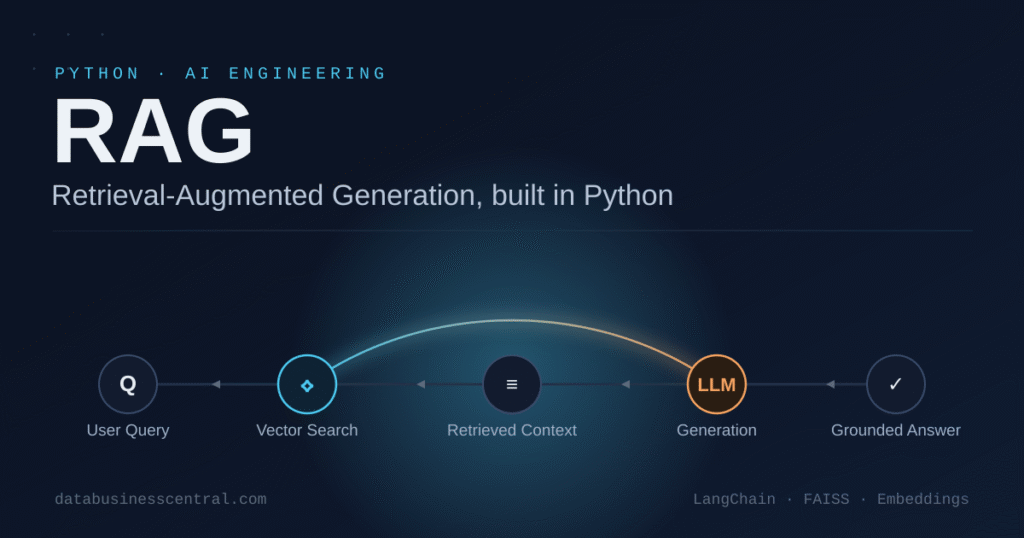
Here’s the flow in plain terms: Query → Embed → Retrieve → Augment Prompt → Generate Answer. Every step matters, and weak links anywhere in that chain — bad chunking, a mismatched embedding model, a sloppy prompt — will show up as a worse answer at the end.
Setting Up Your Python Environment
We’ll use a lightweight, fully open-source stack: sentence-transformers for embeddings, faiss-cpu for vector search, and langchain to wire the pipeline together. You can swap in OpenAI, Anthropic, or any hosted LLM at the generation step.
bash
pip install langchain langchain-community sentence-transformers faiss-cpu pypdf tiktokenStep 1: Load and Chunk Your Documents
Chunking is one of the most underrated levers in a RAG system. Chunks that are too large dilute relevance; chunks that are too small lose context. A chunk size of 500–1000 characters with some overlap is a reasonable default for most text-heavy documents.
from langchain_community.document_loaders import PyPDFLoader
from langchain.text_splitter import RecursiveCharacterTextSplitter

loader = PyPDFLoader("company_handbook.pdf")
documents = loader.load()

splitter = RecursiveCharacterTextSplitter(
    chunk_size=800,
    chunk_overlap=100,
    separators=["\n\n", "\n", ". ", " "]
)
chunks = splitter.split_documents(documents)

print(f"Loaded {len(documents)} pages, split into {len(chunks)} chunks")
Step 2: Generate Embeddings
Embeddings turn text into vectors that capture meaning, so that semantically similar passages land close together in vector space, even if they don’t share exact keywords. all-MiniLM-L6-v2 is a fast, capable open-source model that runs comfortably on CPU.
from langchain_community.embeddings import HuggingFaceEmbeddings

embedding_model = HuggingFaceEmbeddings(
    model_name="sentence-transformers/all-MiniLM-L6-v2"
)
Step 3: Build the Vector Store
FAISS (Facebook AI Similarity Search) indexes your embeddings so that, given a query vector, it can return the nearest matches in milliseconds — even across millions of chunks.
from langchain_community.vectorstores import FAISS

vector_store = FAISS.from_documents(chunks, embedding_model)
vector_store.save_local("faiss_index")

retriever = vector_store.as_retriever(search_kwargs={"k": 4})
The k=4 parameter tells the retriever to pull the four most relevant chunks per query — a starting point worth tuning based on your document length and how much context your LLM can comfortably handle.
Step 4: Connect the Retriever to a Language Model
This is where retrieval becomes retrieval-augmented generation. The retrieved chunks are inserted into a prompt template, and the LLM is instructed to answer strictly from that context.
python
from langchain.prompts import PromptTemplate
from langchain.chains import RetrievalQA
from langchain_community.llms import HuggingFacePipeline
from transformers import pipeline

generator = pipeline(
    "text2text-generation",
    model="google/flan-t5-base",
    max_length=512
)
llm = HuggingFacePipeline(pipeline=generator)

prompt_template = PromptTemplate(
    input_variables=["context", "question"],
    template="""
Answer the question using only the context below.
If the answer isn't in the context, say you don't have enough information.

Context:
{context}

Question: {question}
Answer:"""
)

qa_chain = RetrievalQA.from_chain_type(
    llm=llm,
    retriever=retriever,
    chain_type_kwargs={"prompt": prompt_template},
    return_source_documents=True
)
Swap HuggingFacePipeline for ChatOpenAI, ChatAnthropic, or any other LangChain-supported chat model if you want production-grade generation quality — the retrieval half of the pipeline stays identical either way.
Step 5: Query the Pipeline
python
response = qa_chain.invoke({"query": "What is our company's remote work policy?"})

print("Answer:", response["result"])
print("\nSources used:")
for doc in response["source_documents"]:
    print("-", doc.metadata.get("source", "unknown"), "| page:", doc.metadata.get("page"))
Notice that the output includes source documents. This traceability is one of RAG’s biggest practical advantages over a plain fine-tuned model: you can show exactly which passage produced the answer, which matters enormously for support teams, auditors, and any regulated industry.
Improving Retrieval Quality
A working pipeline is easy. A good one takes tuning. A few techniques that consistently move the needle:
- Hybrid search: Combine dense vector search with traditional keyword search (BM25) so you don’t lose exact-match terms like product codes or legal clause numbers that embeddings sometimes blur.
- Reranking: Retrieve a larger candidate set (say, 20 chunks) and use a cross-encoder reranker to reorder them by true relevance before passing the top few to the LLM.
- Metadata filtering: Tag chunks with metadata (department, document date, product line) so retrieval can be scoped, not just semantic.
- Chunk overlap tuning: Test a few chunk sizes against a small labeled evaluation set rather than guessing once and moving on.
- Query rewriting: Have the LLM rephrase vague or conversational queries into a more search-friendly form before retrieval runs.
Evaluating Your RAG System
Treat retrieval quality as a data problem, not a vibe. Two metrics are worth tracking from day one:
- Retrieval precision: Of the chunks retrieved, how many were actually relevant to the question?
- Answer faithfulness: Does the generated answer actually match what the retrieved context says, without adding unsupported claims?
Frameworks like RAGAS or a simple manually-labeled test set of 30–50 representative questions will surface weak spots far faster than reading transcripts one at a time.
Common Pitfalls to Avoid
- Skipping chunk overlap — this causes sentences to be cut mid-thought, losing meaning at chunk boundaries.
- Using a mismatched embedding model between indexing and querying, which silently breaks similarity search.
- Overstuffing the prompt with too many retrieved chunks, pushing the actual question out of the model’s effective attention.
- Never refreshing the index as source documents change, leaving the system confidently wrong about outdated policies.
- Treating RAG as “done” after one pass — retrieval quality degrades as your document base grows unless you monitor it.
Real-World Applications
RAG has moved well past chatbots. Teams are using this same architecture for internal knowledge assistants that search company wikis, customer support tools that ground answers in product documentation, financial research assistants that pull from filings and earnings transcripts, and developer tools that answer questions using an entire codebase as the retrieval source. Any scenario where accuracy, freshness, and traceability matter more than raw creativity is a strong candidate for RAG over a purely generative approach.
Conclusion
Implementing Retrieval-Augmented Generation with Python doesn’t require a research team or a massive infrastructure budget. With a chunking strategy, an embedding model, a vector store like FAISS, and a language model wired together through LangChain, you can build a system that answers questions using your organization’s actual knowledge — not a frozen snapshot from a training run months or years ago.
Start small: index one document set, measure retrieval quality honestly, and tune chunking and reranking before you scale up. The teams getting the most value from generative AI right now aren’t the ones with the biggest models — they’re the ones whose models know where to look.

2 thoughts on “Implementing Retrieval-Augmented Generation (RAG) with Python”
Great content! Keep up the good work!
Pingback: Build Production-Ready AI Agents with Python: From MCP to Multi-Agent Systems - DATA BUSINESS CENTRAL